Multi-select Input Controls
The 16. Interactive Sales Report has an example of a multi-select input control for Product Name.
To run a report with a multi-select input control
- In the repository, locate and run the report 16. Interactive Sales Report.
- In the Filters panel, enter onion in the Search list
 for the Product Name input control.
Only products containing "onion" are shown. - Click the first item in the list, then scroll down and Shift-click to select all the items with "onion".
- Click in the Search list again and delete the word onion.
All items are displayed, with ones that include "onion" selected. - Click the Selected tab to see that only items that are selected are displayed. Then click the Available tab to view all the items.
- Click Invert
 to invert the selection.
Now all items are selected except those items that contain "onion". - Click Apply at the bottom of the panel. The report shows data only for products that do not contain the word "onion."
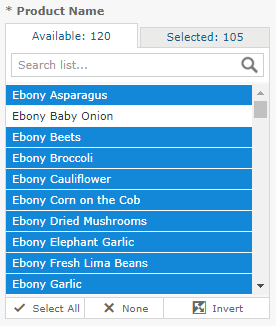
Figure 1 Multi-Input Control Selection