Running a Report Book
Report books are multiple reports bundled into a single object, created in Jaspersoft Studio. You can run and view report books from the Library page or the repository, much like you would a standard report. However, report books contain some elements that are not found in standard reports.
To run a report book in the Report Viewer
-
In the repository, click the name of the report book you want to run. For example, click the sample 17. Report Workbook. The report appears, as shown below.
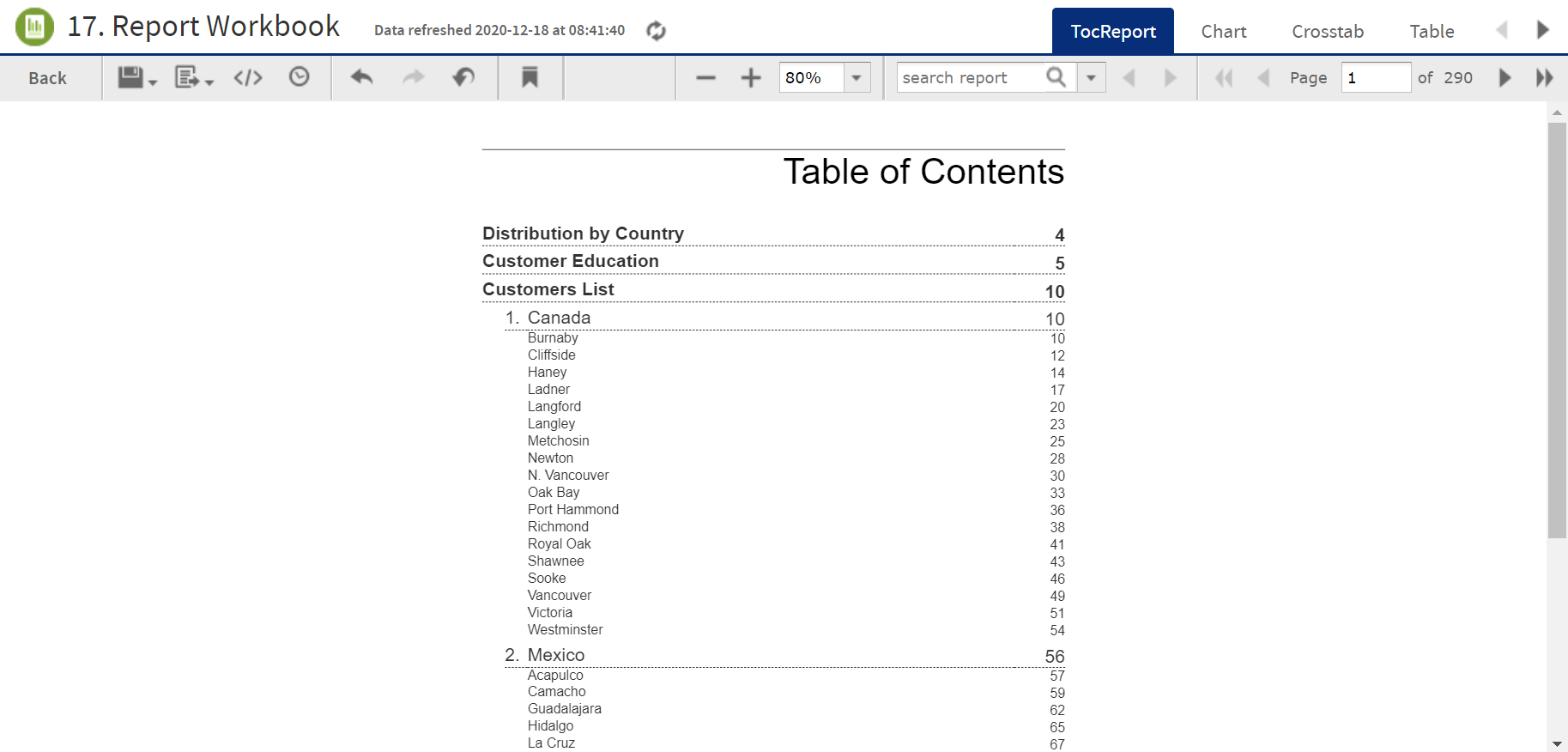
Figure 1 Sample report book as seen in the Report Viewer
The sample report book contains three bundled reports:
-
Distribution by Country, a chart-type report.
-
Customer Education, a crosstab-type report.
-
Customers List, a table-type report.
Each of these reports can be accessed by a tab, along with the Table of Contents page, located at the top of the Report Viewer.
-
-
Click the Chart tab to open the Customer Distribution by Country report. Note that you can interact with this report as you would with a standard chart-based report in the viewer.
-
Click the TocReport tab to return to the table of contents page.
-
Scroll down and click the Acapulco entry in the table of contents. The first page of the Acapulco table entries is displayed.
-
Click
 to open the bookmarks pane.
 -
Click the Customer Education entry in the bookmarks pane. The Customer Education crosstab report opens in the viewer.
-
Close the bookmarks pane by clicking the x in the upper right corner of the pane.