The sample database
Jaspersoft Desktop includes a small database to try reports on: the sales of Brightwater Trading, an invented wholesaler of goods for the home and the garden. It sells to shops in fifteen countries from six offices, and holds three years of orders, 2023 to 2025. Every name in it is made up.
It comes with the Samples workspace: there is nothing to install and no server to run. It can only be read: a report cannot change it.
Connecting to it
The Samples workspace (home screen, View samples and tutorials) has its data adapter ready,
Sample Database.jrdax. The database and its driver are two libraries of that workspace, in its
JR-INF/lib folder: hsqldb-<version>.jar and sample-database.jar.
To use the database in another workspace, add those two files to it in Settings › Libraries (see Workspace settings), then create a JDBC data adapter (see Working with data adapters) with:
| Setting | Value |
|---|---|
| JDBC Driver | org.hsqldb.jdbc.JDBCDriver |
| JDBC URL | jdbc:hsqldb:res:/sample-database/sample |
| Username | SA |
| Password | empty |
The URL names a resource inside sample-database.jar, not a file or a server: the database is
reached only by the reports of a workspace that has that library.
Its tables
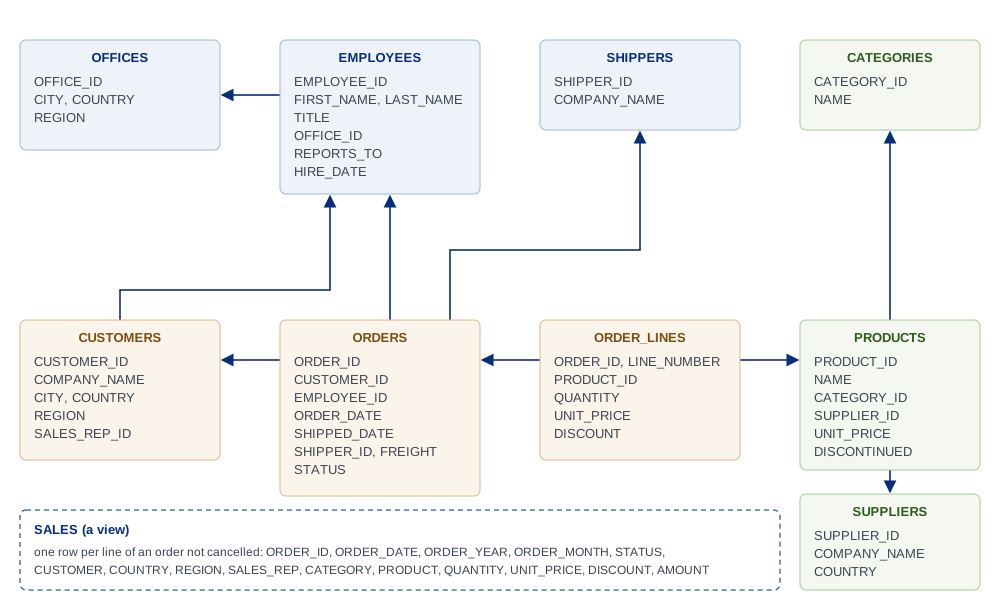
| Table | Rows | What it holds |
|---|---|---|
ORDERS |
2,791 | An order: its customer, the employee who took it, the dates (ORDER_DATE, REQUIRED_DATE, SHIPPED_DATE), the shipper, the freight and the STATUS: Shipped, Pending (not shipped yet, at the end of 2025) or Cancelled. |
ORDER_LINES |
9,035 | The lines of an order (ORDER_ID, LINE_NUMBER): the product, the QUANTITY, the UNIT_PRICE of that day and the DISCOUNT (0, 0.05 or 0.10). |
CUSTOMERS |
88 | The shops: name, contact, address, COUNTRY, REGION and the sales representative who follows them (SALES_REP_ID). |
PRODUCTS |
64 | The catalog: name, category, supplier, today's UNIT_PRICE, the stock, and whether it is DISCONTINUED. |
CATEGORIES |
8 | Kitchen, Tableware, Home Decor, Lighting, Textiles, Storage, Garden, Outdoor Living. |
SUPPLIERS |
10 | Who makes the products. |
EMPLOYEES |
19 | The staff: a chief executive, three sales directors and the sales representatives, each with the one they report to (REPORTS_TO) and an OFFICE_ID. |
OFFICES |
6 | Milan, Hamburg, London, Chicago, São Paulo and Sydney, each in a REGION: Europe, North America, Latin America, Asia Pacific. |
SHIPPERS |
3 | The carriers of the orders. |
The names are in capitals, as the database returns them: a report's fields are $F{ORDER_DATE},
$F{COUNTRY}. A query can write them in any case (select order_date from orders).
The view SALES
SALES is a view: one row per line of an order that was not cancelled, with what a first report
wants beside it, so that no join is needed:
| Column | |
|---|---|
ORDER_ID, ORDER_DATE, ORDER_YEAR, ORDER_MONTH, STATUS |
The order |
CUSTOMER, COUNTRY, REGION |
Who bought |
SALES_REP |
Who sold, first and last name |
CATEGORY, PRODUCT |
What was sold |
QUANTITY, UNIT_PRICE, DISCOUNT |
The line |
AMOUNT |
What the line is worth: quantity × price × (1 − discount) |
For example, the sales of each country in 2025:
SELECT COUNTRY, SUM(AMOUNT) AS SALES
FROM SALES
WHERE ORDER_YEAR = 2025
GROUP BY COUNTRY
ORDER BY SALES DESC
What is in the data
The data is made so that reports have something to show:
- the business grows by about a fifth each year, and every year sells most in November and December;
- a few customers buy a lot and many buy a little, for rankings;
- prices rise by 4% a year:
ORDER_LINES.UNIT_PRICEis the price of the day,PRODUCTS.UNIT_PRICEtoday's; - two products were discontinued in 2024;
- the last orders of 2025 are still
Pending, and about one order in fifty isCancelled.
The database is the same in every copy of Jaspersoft Desktop of a version, so the figures in the tutorials are the ones you get.