Formatting Elements
Formatting tools help organize the elements in the report. Right-click the element that you want to work on and select a tool from the context menu.
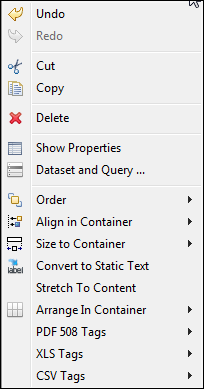 |
| Figure 1 Formatting Tools Menu |
The tools in the context menu are specific to the selected items. The following tables explain the tools.
Note
A container is the band, frame, or cell that contains the element.
Formatting Tools
Icon |
Tool Name |
Description |
Multiple Select? |
|---|---|---|---|
Order Tools |
|||
|
Send Backward |
Moves the element behind its current layer. |
Yes |
|
Send to Back |
Moves the element to the bottom layer. |
Yes |
Align in Container Tools |
|||
|
Align to Left |
Aligns the left side to that of the primary element. |
Yes |
|
Align to Center |
Aligns the center to that of the primary element. |
Yes |
|
Align to Right |
Aligns the right side to that of the primary element. |
Yes |
|
Align to Top |
Aligns the top side (or the upper part) to that of the primary element. |
Yes |
|
Align to Middle |
Aligns the middle to that of the primary element. |
Yes |
|
Align to Bottom |
Aligns the bottom side (or the lower part) to that of the primary element. |
Yes |
Size Components Tools |
|||
|
Match Width |
Adjusts the width to that of the primary element. |
Yes |
|
Match Height |
Adjusts height to that of the primary element. |
Yes |
|
Match Size |
Resizes to that of the primary element. |
Yes |
Size to Container Tools |
|||
|
Fit to Width |
Adjusts elements to fill width of container. |
Yes |
|
Fit to Height |
Adjusts elements to fill height of container. |
Yes |
|
Fit to Both |
Adjusts elements to fill width and height of container. |
Yes |
Arrange in Container Tools |
|||
|
Horizontal Layout |
Centers selected elements vertically. |
Yes |
|
Vertical Layout |
Centers selected elements horizontally. |
Yes |
 |
Grid Layout | Positions elements in a grid based on properties set on each element. | Yes |
Miscellaneous Tools |
|||
Stretch to Content |
Resizes element to fit the content |
N/A |
|
PDF 508 Tags |
Adds tags required for PDF 508C compliance |
||
XLS Tags |
Adds tags that define how data is exported to the Microsoft Excel format |
||


