Uploading an Access Grant Schema
To upload an access grant schema (AGXML)
-
Click View> Repository .
The repository page appears.
-
In the Folders panel, navigate to Organization > Organization > Analysis Components > Analysis Schemas.
-
Right-click the folder and select Add Resource > File > Access Grant Schema.
The Upload a File From Your Local Computer page appears and prompts you to select a file and set its properties.
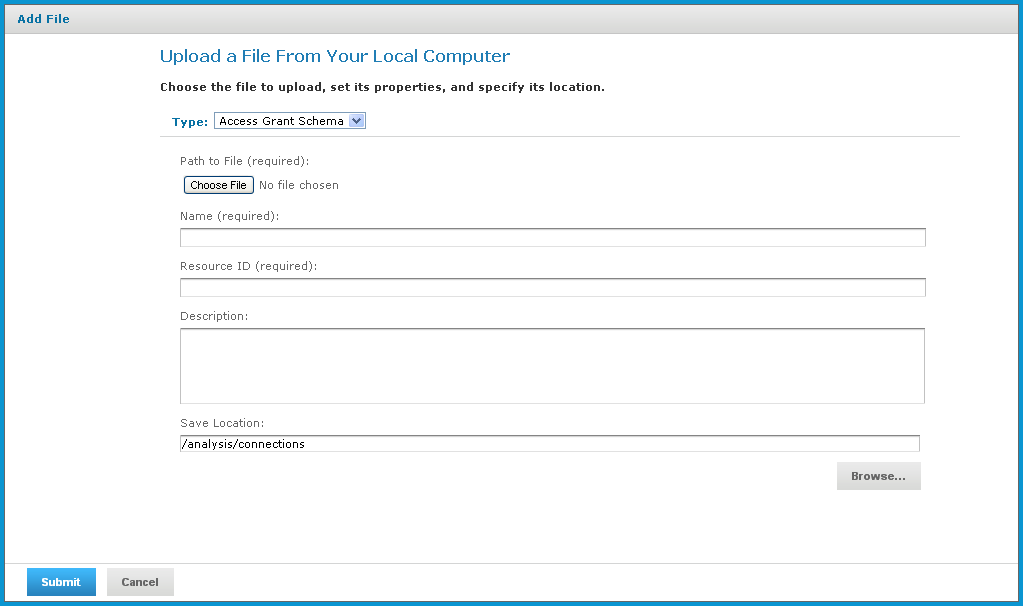
Figure 1 Upload a File From Your Local Computer - Access Grant Schema
-
Under Path to File, click Choose File and locate the access grant schema you want to add.
-
Enter a name and description for the schema.
The Resource ID is auto-generated as you type in the Name field. You can change the ID if necessary.
-
To select a different folder to hold the schema, click Browse next to the Save Location field and navigate to the location in the repository where you want the file to reside.
-
Click Submit.
The new file appears in the repository.