Creating an XML/A Source
An XML/A source provides access to a single catalog (database schema) referenced by a Mondrian connection in a local instance of JasperReports Server. It defines a particular Mondrian connection in the repository that answers OLAP requests. The XML/A source is referenced by remote clients (such as an XML/A connection in a remote instance of JasperReports Server). The catalog name that you specify uniquely defines the data that an XML/A client can retrieve from the source.
An XML/A source is also sometimes called an XML/A definition.
To add an XML/A source
-
Click View > Repository.
-
In the Folder panel, navigate to Organization > Analysis Components > xml/a.
-
Right-click the folder and select Add Resource > Mondrian XML/A Source from the context-menu.
The Set Mondrian XML/A Source Properties page appears and prompts you to enter basic information.
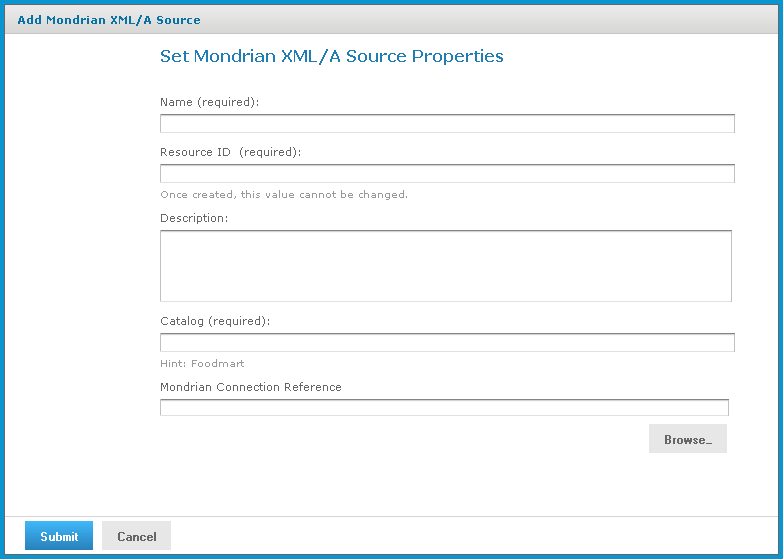
Set Mondrian XML/A Source Properties Page
-
Enter XML/A source information. For example:
Name SugarCrmMondrianXmlaSource Resource ID Sugar CRM Mondrian XML/A Source Description Sugar CRM Mondrian XML/A Source Catalog The name of the database that contains the data to analyze. Mondrian Connection Reference The path and name of the connection this XML/A source references. If the XML/A provider is JasperReports Server, its value is the connection’s URI. -
Click Submit to save the XML/A source.
Once you create an XML/A source in and an XML/A provider such as Jaspersoft OLAP, you must create an XML/A connection in your client application that points to it. For more information, see Performance Tuning.